Creating a dedicated charging station for your devices is a practical way to keep your space organized and ensure your gadgets are always charged and ready to use. Whether at home or in the office, a charging station helps reduce clutter from cables scattered around and simplifies your daily routine.
In this post, we’ll guide you through the process of setting up a functional charging station that fits your needs.
Why Set Up a Charging Station?
With so many devices like smartphones, tablets, laptops, wireless headphones, and smartwatches, charging can become chaotic. A charging station:
– Centralizes all charging needs in one spot
– Keeps cables and chargers organized and untangled
– Protects devices from damage caused by clutter or accidental drops
– Saves time by always knowing where to charge your devices
– Improves the look of your area with a neat and tidy setup
Step 1: Choose the Right Location
Start by selecting a convenient location for your charging station. Consider:
– Accessibility: Pick a spot that is easy to reach for daily use, like a desk, a shelf, or a side table.
– Power Source: Ensure the area is near electrical outlets to plug in chargers or power strips.
– Space: Choose an area with enough room for your charging equipment and devices.
– Safety: Avoid places near water or heat sources where devices or electronics could be damaged.
Step 2: Gather Charging Equipment
You will need several items depending on your devices:
– Power strip or multi-port USB charger: A power strip with surge protection or a multi-port USB charger allows you to plug in multiple devices at once.
– Charging cables: Collect all necessary cables such as Lightning, USB-C, or micro-USB based on your devices.
– Charging docks or stands (optional): These help hold devices upright and can reduce wear on charging ports.
– Cable organizers: Velcro straps, clips, or cable sleeves keep cords untangled and tidy.
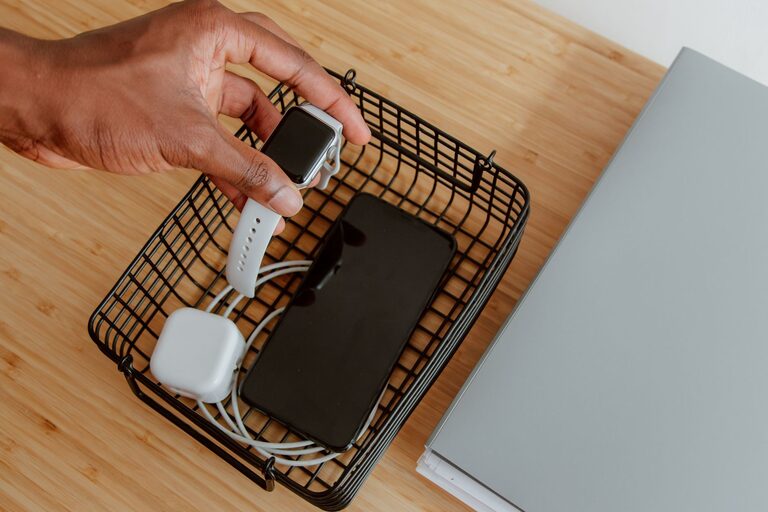
– Containers or trays: To hold smaller items like earbuds, adapters, or power bricks.
Step 3: Organize Cables and Chargers
Tangled cables are a common annoyance. Here’s how to keep them neat:
- **Label cables:** Use small tags or tape to identify which cable belongs to which device.
- **Bundle excess length:** Use Velcro straps or twist ties to keep extra cable length compact.
- **Use cable clips or holders:** Attach these to your desk or wall to hold cables in place and prevent them from hanging loosely.
- **Separate charging ports:** If using a power strip, space out plugs to avoid crowding.
Step 4: Set Up Your Devices
Arrange your devices on or near the charging station:
– Position frequently used devices within easy reach.
– Use stands or docks to keep devices upright and viewable while charging.
– Place smaller devices like earbuds in containers to avoid losing them.
– Keep devices spaced apart to allow airflow and avoid overheating.
Step 5: Maintain Your Charging Station
Regular upkeep helps your charging station stay functional:
– Check cables periodically for wear or damage and replace if needed.
– Keep the area dust-free to prevent buildup on devices and chargers.
– Remove devices once fully charged to avoid unnecessary power consumption.
– Update chargers and cables as technology changes or devices are added.
Tips for an Efficient Charging Station
– Choose universal chargers: A charger with multiple USB ports or wireless charging pads reduces the number of adapters.
– Use wireless charging: If your devices support it, wireless pads can reduce cable clutter.
– Portable power banks: Keep a charged power bank nearby for on-the-go needs.
– Safety first: Avoid overloading power strips and use surge protectors to protect devices during power surges.
Conclusion
Setting up a charging station is a straightforward way to simplify your device management and enhance your space’s organization. By choosing the right location, gathering appropriate equipment, organizing cables, and maintaining the setup, you ensure all your gadgets are ready when you need them without the frustration of messy cables.
Take some time to customize your charging station based on your specific devices and habits, and enjoy the benefits of a clutter-free, efficient charging solution!
—
We hope this guide helps you create the ideal charging spot for your devices. Happy charging!
About the Author